


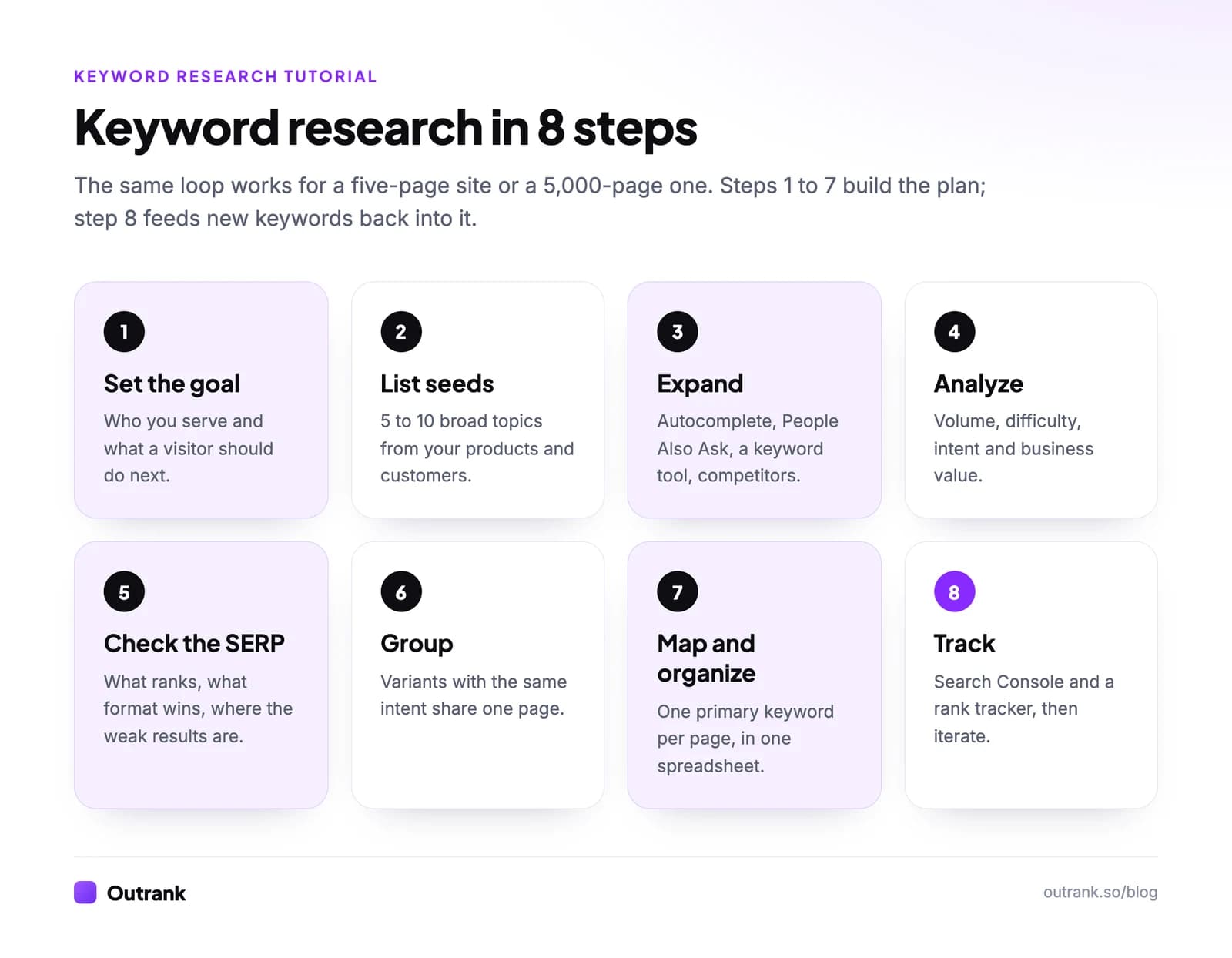
To do keyword research, follow eight steps: set your goal and audience, list 5–10 seed keywords, expand them with Google and a keyword tool, analyze each keyword's volume, difficulty and intent, check the search results page, group variants by intent, map one primary keyword to each page in a spreadsheet, and track your rankings. A beginner can finish a first pass in an afternoon with free tools: Google Autocomplete, People Also Ask and Search Console.
This tutorial covers the basics you need first, each step with exact menu paths, the tools worth using, a spreadsheet layout for organizing everything, how to track keywords as a beginner, and a checklist you can tick off as you go.
Key takeaways
- Keyword research has eight steps. Goal, seeds, expansion, analysis, SERP check, grouping, mapping, tracking.
- You can start for free with Google Autocomplete, People Also Ask, Google Trends and Search Console. Paid tools add accurate volume and difficulty at scale.
- New sites should target low-difficulty, specific keywords. Outrank's median target across 189,369 keywords has a difficulty of 14 and 170 monthly searches.
- One primary keyword per page. Two pages targeting the same keyword compete with each other.
- Track in Search Console from day one. It shows the real queries, impressions and average position for every page, for free.
Keyword research basics: the terms you need
Keyword research is the process of finding the search terms your audience uses, measuring their demand and competition, and deciding which page should target which term. Before the steps, learn these seven terms:
| Term | What it means |
|---|---|
| Keyword | A word or phrase people type into a search engine, like "cold brew ratio" |
| Search volume | Estimated searches per month for a keyword, usually from a tool |
| Keyword difficulty (KD) | A 0–100 score estimating how hard it is to reach page one; each tool calculates it differently |
| Search intent | What the searcher wants: to learn (informational), compare (commercial), buy (transactional) or reach a site (navigational) |
| Short-tail / long-tail | Broad, high-volume terms vs specific, low-volume ones (explained here) |
| SERP | The search engine results page, including AI Overviews, People Also Ask, videos and local packs |
| Keyword map | A document that assigns one primary keyword to each page on your site |
Step 1: Define your goal and audience
Write down who you want to reach and what you want them to do after they land. "Homeowners who make coffee at home and might buy a cold brew maker" leads to very different keywords than "café owners looking for wholesale beans".
This one sentence will filter every keyword later. If a keyword's searcher could never become your customer or reader, it doesn't belong on the list, no matter how big its volume.
Step 2: Brainstorm seed keywords
Seed keywords are the 5–10 broad terms that describe your business: product categories, services, the problems you solve. Pull them from your site navigation, your best-selling products, sales and support conversations, and the words customers use in reviews.
For a coffee gear store, seeds might be "cold brew maker", "cold brew ratio", "pour over coffee", "coffee grinder" and "french press".
Step 3: Expand your list
Turn each seed into dozens of specific keywords:
- Google Autocomplete: type the seed plus "for", "vs", "how", "why", "best" or each letter of the alphabet.
- People Also Ask and Related searches: every question is a keyword candidate.
- A keyword tool: paste the seed into Ahrefs Keywords Explorer (Matching terms and Questions reports), Semrush Keyword Magic Tool, or a free tool like Google Keyword Planner.
- Competitors: Ahrefs Site Explorer (Organic keywords) or Semrush Organic Research shows the keywords a competing site ranks for. A keyword gap analysis compares several at once.
- Your Search Console: queries you already get impressions for are the easiest wins.
Aim for a few hundred raw keywords before you filter. For a complete expansion on one seed, see our keyword research example.
Step 4: Analyze each keyword
This is keyword analysis: judging each keyword on four criteria before you spend time on it.
- Search volume. Enough people search it to matter. For most small sites, the sweet spot is long-tail: Outrank's median target keyword gets 170 searches a month, and 96.7% of its targets get under 1,000. See how to find keyword search volume for free methods.
- Keyword difficulty. You can realistically reach page one. Across Outrank customers, the median target has a KD of 14 and 63% are under 20.
- Search intent. You can serve what the searcher wants. A "buy" keyword needs a product page; a "how to" keyword needs a guide.
- Business value. Ranking for it moves you toward your goal from Step 1.
Difficulty scales differ by tool. Semrush, for example, labels its scale like this (source):
| Semrush KD % | Label |
|---|---|
| 0–14 | Very easy |
| 15–29 | Easy |
| 30–49 | Possible |
| 50–69 | Difficult |
| 70–84 | Hard |
| 85–100 | Very hard |
New sites should stay in the "very easy" and "easy" bands. Read what keyword difficulty measures to understand the score's limits, then score each keyword quickly (high, medium, low) on all four criteria. Keep the ones that are relevant and winnable, even if their volume is small.
Step 5: Check the search results page
Google each shortlisted keyword and look at page one before you commit:
- What type of page ranks? Product pages, guides, listicles, videos or tools. Copy the format that wins.
- Who ranks? Forum threads, thin pages and outdated articles in the top 10 are an opening. Ten strong, specific pages from big brands are a warning.
- What sits above the links? An AI Overview, a featured snippet, a video carousel or a local pack all take clicks before the first organic result.
This takes a minute per keyword and saves you from writing pages that can't rank.
Step 6: Group keywords by topic and intent
Many of your keywords will be variants of the same need: "cold brew ratio", "cold brew ratio grams" and "cold brew ratio in cups" all want the same answer. Put those on one page. Keywords with different intents get different pages.
The simplest test: if two keywords share several of the same top-10 results, they belong together. That technique is called keyword clustering, and it prevents keyword cannibalization, where your own pages compete for the same query.
Step 7: Organize your keyword research in a spreadsheet
Keep everything in one sheet, one row per keyword. These columns cover what a beginner needs:
| Column | Example | Why it matters |
|---|---|---|
| Keyword | cold brew ratio grams | The exact phrase |
| Volume | from your tool | Demand |
| KD | from your tool | Difficulty |
| Intent | Informational | Decides the page type |
| Cluster | Cold brew ratio | Groups variants |
| Role | Primary / Supporting | One primary per page |
| Target URL | /cold-brew-ratio | Existing page or "new" |
| Status | Idea / Writing / Published | Workflow |
| Position | from Search Console | Progress |
| Notes | "Add calculator" | SERP observations |
Sort by cluster, then mark one primary keyword per cluster. That primary keyword goes in the page's title, H1, URL and first sentence; the supporting keywords become H2s or FAQ questions.
Step 8: Track your keywords
Keyword tracking for beginners starts with Google Search Console, which is free and shows real data rather than estimates:
- Open Search Console → Performance → Search results.
- Click + Add filter → Page and enter the URL you published, or Query for a single keyword.
- Turn on Average position alongside clicks and impressions.
- Use Date → Compare to compare the last 28 days with the previous period.
Check each new page four to eight weeks after publishing. The Queries tab will show keywords you never targeted; add sections for the relevant ones, and the page will grow. When you outgrow Search Console, a rank tracker adds daily positions and competitor tracking. Our guides to tracking Google rankings for free and the best keyword rank checking tools cover both.
Keyword research tools for beginners
Keyword research tools compared (October 2026)
| Google Autocomplete and People Also Ask | Yes, fully free | Real long-tail phrasing and questions | No volume or difficulty data |
| Google Search Console | Yes, fully free | Queries you already rank for, with real impressions and position | Only shows your own site |
| Google Keyword Planner | Free with a Google Ads account | Volume estimates for ad keywords | Very low-volume keywords aren't shown |
| Google Trends | Yes, fully free | Seasonality and rising topics | Relative interest, not search counts |
| AnswerThePublic | Paid plans from $20/month | Question-shaped keyword ideas | Ideas only, verify volume elsewhere |
| Ahrefs | Free plan for your own site, free keyword generator | Competitor keywords, difficulty, Parent Topic | Full Keywords Explorer needs a paid plan |
| Semrush | Free plan (10 reports a day), 7-day trial | Keyword Magic Tool filters, intent labels | Free limits run out fast |
| Outrank | Free blog keyword generator; 3-day trial | Automated keyword research plus daily articles and publishing | Built to act on keywords, not for manual audits |
Click a column header to sort.
If your goal is to publish on the keywords you find, Outrank combines the research and the writing: unlimited keyword research with live volume and difficulty, then one researched, SEO-optimized article a day published to your CMS, on the $99/month Organic Growth plan.
Keyword research checklist
Interactive checklist
Keyword research checklist for beginners
0/19
Plan
0/2Expand
0/5Analyze
0/5Organize
0/4Publish and track
0/3Your progress is saved in this browser, so you can come back to it later.
Beginner mistakes to avoid
- Chasing volume. A 40,000-search head term you'll never rank for is worth less than ten 200-search keywords you can win this quarter.
- Ignoring intent. Writing a blog post for a keyword where Google only shows product pages wastes the post.
- One page per variant. "Cold brew ratio" and "cold brew ratio grams" are one page, not two.
- Trusting one number. Volume and difficulty are estimates and differ between tools. The results page and your own Search Console are the reality check.
- Researching once. Keyword research is a monthly loop. Your Search Console queries will keep suggesting new sections and pages.
FAQ
How do I do keyword research as a beginner?
Start with 5–10 seed keywords that describe your business, expand them with Google Autocomplete and People Also Ask, and add volume and difficulty from a free or paid tool. Keep specific, low-difficulty keywords that match what you offer, check what ranks for each, and give every keyword group its own page. Then track the pages in Google Search Console.
What are the steps of keyword research?
The process has eight steps: define your goal and audience, list seed keywords, expand them, analyze volume, difficulty and intent, check the search results page, group keywords by intent, map one primary keyword to each page, and track rankings. Steps three to eight repeat every month as new queries appear.
What is keyword analysis?
Keyword analysis is evaluating a keyword before you target it: its search volume, its difficulty, the intent behind it, what currently ranks on page one, and its value to your business. The goal is to keep keywords that are both relevant and winnable, and drop the rest.
How do I organize keyword research?
Use one spreadsheet with one row per keyword and columns for volume, difficulty, intent, cluster, role (primary or supporting), target URL, status and current position. Sort by cluster and choose one primary keyword per cluster; the primary keyword shapes the page, and supporting keywords become its headings or FAQ questions.
How do I do keyword tracking as a beginner?
Use Google Search Console. Go to Performance → Search results, filter by page or query, turn on Average position, and compare the last 28 days with the previous period. Review each new page four to eight weeks after publishing, and add a rank tracker later if you need daily positions or competitor data.
Can I do keyword research for free?
Yes. Google Autocomplete, People Also Ask, Google Trends and Search Console are free, and Google Keyword Planner is free with a Google Ads account. Free plans from Ahrefs and Semrush add limited volume and difficulty data. Paid tools mainly save time and add competitor data at scale.